2024 ASICS FLORIDA VOLLEYBALL CHALLENGE APRIL19-21
The site for this event is the Orange County Convention Center
Orange County Convention Center
North Hall B
9400 Universal Blvd. Orlando, FL 32819
Head Officials for this event:
Darin Clark 321-698-9130
Mike Gale 321-427-6383
Joya Teter 863-398-5508
Jose Adorno 787-918-0114
Tony Cothron 941-915-9252
Assignor/Championship Desk Official
Sue Wainio 941-744-6747
Orange County Convention Center
North Hall B
9400 Universal Blvd. Orlando, FL 32819
Head Officials for this event:
Darin Clark 321-698-9130
Mike Gale 321-427-6383
Joya Teter 863-398-5508
Jose Adorno 787-918-0114
Tony Cothron 941-915-9252
Assignor/Championship Desk Official
Sue Wainio 941-744-6747
EVENT INFORMATION
Event information is available here. Please click for additional information about the site and the tournament.
Note that we will have one wave of competition Friday morning starting at 8 am.
Saturday there will be a traditional two wave format starting at 8 am.
There will be bracket play Sunday, also starting at 8 am. The last matches for Sunday are scheduled at 3 pm but the majority of courts have their last match at 1 or 2 pm.
Note that we will have one wave of competition Friday morning starting at 8 am.
Saturday there will be a traditional two wave format starting at 8 am.
There will be bracket play Sunday, also starting at 8 am. The last matches for Sunday are scheduled at 3 pm but the majority of courts have their last match at 1 or 2 pm.
IMPORTANT TOURNAMENT INFO
Here are the special rules for THIS event. We will go over them in the meeting, but you can read and review.
1) ALL courts will follow the USAV Championship Manual procedures for this event..
2) ALL courts must have a rostered adult as the R2. This may not be a player even if they are 18.
3) The first time a team plays in the wave they will be allowed 5-4-4 for their warm up time.
4) If you have an Auto-Three (where 3 sets are played regardless of outcome) you will have a second coin toss after set 2. At that coin toss the team may only choose serve or receive.
Rosters
Rosters will be printed on the scoresheets and must be checked for EACH match the team plays in the tournament.
Verify that the player numbers match the jerseys present. Count the players to make sure the number of players does not exceed the number of players listed on the roster.
Verify that the number of coaches present match the number of coaches on the roster.
HAVE THE HEAD COACH REVIEW THE ROSTER AFTER YOU CHECK IT AND INITIAL THAT IT IS CORRECT.
If there are discrepancies, send someone to the Championship Desk to get the problem corrected. Roster changes will not be allowed after the initial match of the tournament for each team.
One more thing that we are implementing this year that is new is that we have given Club Directors a personalized credential that they can use to move around the building. This will allow them to sit on any bench within their club regardless of whether or not they are on the roster. If the official has any question about this, all they have to do is ask the Club Director to show their ID and if it corresponds with the name on their credential, they are free to sit on the bench. Please note that while this allows Club Directors to sit on the bench, they are NOT allowed to intervene in the match (unless they are listed as HEAD Coach on the roster).
They are also not allowed to coach/give instructions to players unless they are (at minimum) listed as an Assistant Coach on the roster...and if they ARE listed as an Assistant Coach on the roster, then they are governed by Rule 5.3.1:
“One assistant coach at a time may stand to give instructions to the players on the court but has no right to intervene in the match. During play, the assistant coach may give these instructions while standing or walking within the free zone in front of his/her team’s bench from the extension of the attack line up to and including the warm-up area, without disturbing or delaying the match. The assistant coach must not obstruct the view of the line judges.”
AutoThrees
Check your scoreshhet! If it says "Play three sets" you have an Auto Three. You will play three sets regardless of outcome. This is a BID event SO WE WILL DO A COIN TOSS FOR SET ONE (Choice serve, receive or side) AND A COIN TOSS FOR SET 3 (Choice serve or receive only - no side switch)
Tie Breakers
When you have the last match of the wave do not leave until you check with Championship to see if there is a tiebreaker.
Protests
New this season: USAV 5.1.2.1, added: Judgment decisions are not subject to protest. A protest related to a judgment decision may result in a penalty (red card) being assessed to the coach. The rule states that a red card may be issued if a coach/captain protests judgment. This penalty may only be assessed by the PROTEST COMMITTEE. The referee may not assess a red card if a coach/captain attempts to protest judgment. The 1st referee simply denies the protest and informs the coach/captain that it is a judgment call. If the coach/captain insists on protesting, inform the coach/captain that a red card may be assessed if the protest committee confirms it was judgment, and then accept the protest.
1) ALL courts will follow the USAV Championship Manual procedures for this event..
2) ALL courts must have a rostered adult as the R2. This may not be a player even if they are 18.
3) The first time a team plays in the wave they will be allowed 5-4-4 for their warm up time.
4) If you have an Auto-Three (where 3 sets are played regardless of outcome) you will have a second coin toss after set 2. At that coin toss the team may only choose serve or receive.
Rosters
Rosters will be printed on the scoresheets and must be checked for EACH match the team plays in the tournament.
Verify that the player numbers match the jerseys present. Count the players to make sure the number of players does not exceed the number of players listed on the roster.
Verify that the number of coaches present match the number of coaches on the roster.
HAVE THE HEAD COACH REVIEW THE ROSTER AFTER YOU CHECK IT AND INITIAL THAT IT IS CORRECT.
If there are discrepancies, send someone to the Championship Desk to get the problem corrected. Roster changes will not be allowed after the initial match of the tournament for each team.
One more thing that we are implementing this year that is new is that we have given Club Directors a personalized credential that they can use to move around the building. This will allow them to sit on any bench within their club regardless of whether or not they are on the roster. If the official has any question about this, all they have to do is ask the Club Director to show their ID and if it corresponds with the name on their credential, they are free to sit on the bench. Please note that while this allows Club Directors to sit on the bench, they are NOT allowed to intervene in the match (unless they are listed as HEAD Coach on the roster).
They are also not allowed to coach/give instructions to players unless they are (at minimum) listed as an Assistant Coach on the roster...and if they ARE listed as an Assistant Coach on the roster, then they are governed by Rule 5.3.1:
“One assistant coach at a time may stand to give instructions to the players on the court but has no right to intervene in the match. During play, the assistant coach may give these instructions while standing or walking within the free zone in front of his/her team’s bench from the extension of the attack line up to and including the warm-up area, without disturbing or delaying the match. The assistant coach must not obstruct the view of the line judges.”
AutoThrees
Check your scoreshhet! If it says "Play three sets" you have an Auto Three. You will play three sets regardless of outcome. This is a BID event SO WE WILL DO A COIN TOSS FOR SET ONE (Choice serve, receive or side) AND A COIN TOSS FOR SET 3 (Choice serve or receive only - no side switch)
Tie Breakers
When you have the last match of the wave do not leave until you check with Championship to see if there is a tiebreaker.
Protests
New this season: USAV 5.1.2.1, added: Judgment decisions are not subject to protest. A protest related to a judgment decision may result in a penalty (red card) being assessed to the coach. The rule states that a red card may be issued if a coach/captain protests judgment. This penalty may only be assessed by the PROTEST COMMITTEE. The referee may not assess a red card if a coach/captain attempts to protest judgment. The 1st referee simply denies the protest and informs the coach/captain that it is a judgment call. If the coach/captain insists on protesting, inform the coach/captain that a red card may be assessed if the protest committee confirms it was judgment, and then accept the protest.
SCORESHEETS
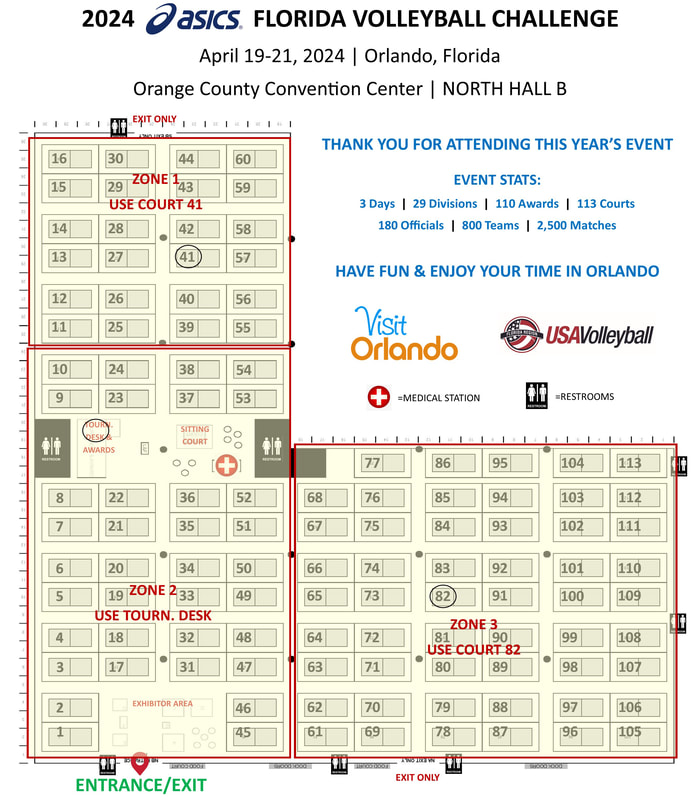
We will have 3 locations for scoresheets so that you will not have to walk so far!
Scoresheet pick up and drop off for Friday and Saturday will be:
ZONE 1 DESK NEAR COURT 41
ZONE 2 USE CHAMPIONSHIP DESK
ZONE 3 DESK NEAR COURT 82The following will be available at the main tournament desk at 7am:
Scoresheet pick up and drop off for Friday and Saturday will be:
ZONE 1 DESK NEAR COURT 41
ZONE 2 USE CHAMPIONSHIP DESK
ZONE 3 DESK NEAR COURT 82The following will be available at the main tournament desk at 7am:
- 8am scoresheet
- Volleyball for their court
- Towel for their court
SCHEDULE WILL BE POSTED IN SPORTWRENCH
Grids will be posted here for reference.

| _schedule_export_friday_grid_post.pdf |
| _schedule_export_-saturday_grid_6am.pdf |
| _schedule_export_-sunday-10am.pdf |
TOURNAMENT MEETINGS
There will be a meeting each day at 7:15 am in the Convention Center in Officials Lounge, Room N230.
On Saturday, there will be a second meeting for those who start after the first match. The second meeting will be at 8:00 am.
On Saturday, there will be a second meeting for those who start after the first match. The second meeting will be at 8:00 am.
MEALS
Lunch Friday is 11- 2:30 in the Referee Lounge N230
PARKING PASSES AND RECEIPTS
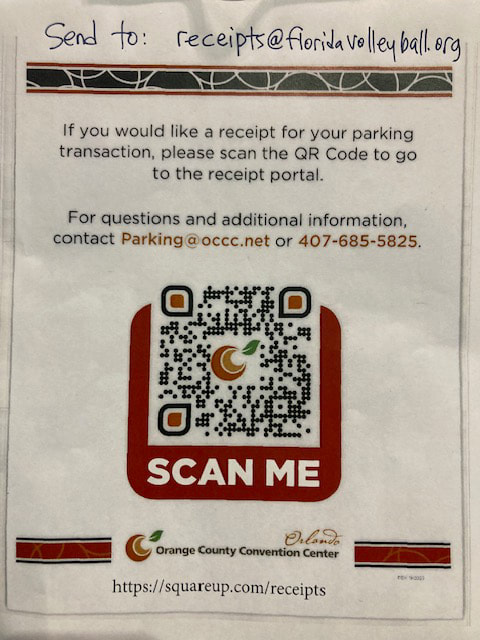
Parking will be covered - For your FIRST DAY of working the tournament, pay your first day of parking at the CC parking lot and FOLLOW PROCEDURE BELOW for a receipt. EMAIL YOUR RECEIPT TO [email protected]. SUBJECT LINE OF THE MAIL MUST BE THE WORD RECEIPT.
You will be reimbursed in your ArbiterPay payment at the end of the event. You MUST have a parking pass for subsequent days, no exceptions.
Parking passes are available at Championship Desk.
You will be reimbursed in your ArbiterPay payment at the end of the event. You MUST have a parking pass for subsequent days, no exceptions.
Parking passes are available at Championship Desk.
HOTEL INFORMATION
IF YOU ARE GOING TO BE ARRIVING AFTER 6 PM YOU SHOULD CALL THE HOTEL AND VERIFY YOUR RESERVATION IN ADVANCE.
Please be patient with the hotel staff. If you have issues checking in to your hotel, use these contacts to resolve the issue.
You MUST call before 10 PM.
Email:
Max Metrovich: [email protected]
Evan Schreiman: [email protected]
Phone:
Max Metrovich: 502-242-6362
Evan Schreiman: 502-792-0200
Room, parking and any resort fees are being covered by the Florida Region on the master account with the hotel. If the hotel is charging you for any of these, please go through the TTS email or phone lines to get them to communicate with the hotel about that issue.
The Region will be covering parking and any resort type fees. If they try to charge you for them now, you can get the following information and bring it to us in the morning. We will get the Housing people to address it. We will get everything resolved ASAP.
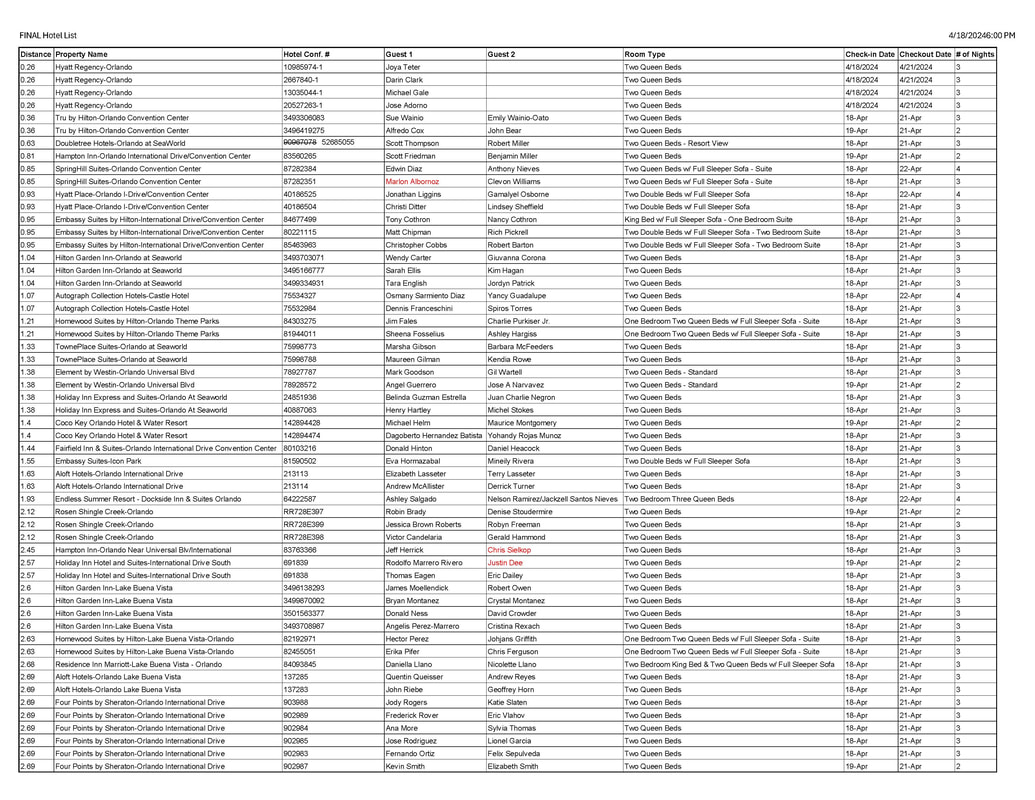
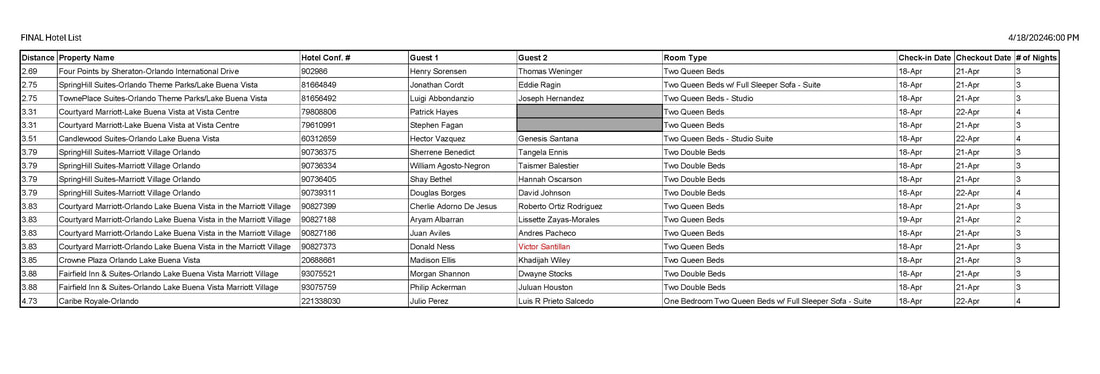
The hotel list shows the name of the hotel. Google the hotel name to obtain the address.
Please be patient with the hotel staff. If you have issues checking in to your hotel, use these contacts to resolve the issue.
You MUST call before 10 PM.
Email:
Max Metrovich: [email protected]
Evan Schreiman: [email protected]
Phone:
Max Metrovich: 502-242-6362
Evan Schreiman: 502-792-0200
Room, parking and any resort fees are being covered by the Florida Region on the master account with the hotel. If the hotel is charging you for any of these, please go through the TTS email or phone lines to get them to communicate with the hotel about that issue.
The Region will be covering parking and any resort type fees. If they try to charge you for them now, you can get the following information and bring it to us in the morning. We will get the Housing people to address it. We will get everything resolved ASAP.
- Hotel Name
- Name of person you spoke with
- Issue that needs to be resolved
- And if you have been given any paperwork, give us a copy
The hotel list shows the name of the hotel. Google the hotel name to obtain the address.
We did our best to honor roommate requests. Not all requests were honored due to drops, adds, late changes, etc.
If you are assigned a room, you are expected to use it. If your plans change, please notify Sue Wainio immediately. [email protected]
If you were not assigned a room it is because your round trip mileage as listed in ZebraWeb is less than the minimum distance. If you have any issues with the commute, please notify Sue immediately [email protected]
Please note: You may be asked to leave a credit card for incidentals. Either you or your roommate can do this, does not have to be both of you. Also, if you use a debit card, there may be a hold placed on funds for a period of time.
Hotel rooms are to be used ONLY by working officials.
PLEASE NOTE: THIS IS THE (REALLY) FINAL LIST!
A few changes in red. Sorry for the inconvenience.
If you are assigned a room, you are expected to use it. If your plans change, please notify Sue Wainio immediately. [email protected]
If you were not assigned a room it is because your round trip mileage as listed in ZebraWeb is less than the minimum distance. If you have any issues with the commute, please notify Sue immediately [email protected]
Please note: You may be asked to leave a credit card for incidentals. Either you or your roommate can do this, does not have to be both of you. Also, if you use a debit card, there may be a hold placed on funds for a period of time.
Hotel rooms are to be used ONLY by working officials.
PLEASE NOTE: THIS IS THE (REALLY) FINAL LIST!
A few changes in red. Sorry for the inconvenience.
| officials_hotel_list_as_of_4.18.24_1030amrev.pdf |
UNIFORMS
Any color of the approved referee uniform shirt may be worn on Friday and Saturday. On Sunday, you may wear any color, but if you are assigned a match with a partner, the two of you should match. Remember that if you can't match, the DEFAULT COLOR IS ALWAYS WHITE. Note that the Mizuno brand officials shirts that some have been given are not approved for this event, as it is sponsored by ASICS.
If you are new and you don't have your certified official shirts yet, a plain white or plain grey polo is acceptable.
If the convention center is cold you may wear your Florida Region grey officials jacket on the stand if you have one. If you do not have one you may wear a plain solid color grey, black or navy jacket. You may also wear the white "Certified Official" jacket.
If you are new and you don't have your certified official shirts yet, a plain white or plain grey polo is acceptable.
If the convention center is cold you may wear your Florida Region grey officials jacket on the stand if you have one. If you do not have one you may wear a plain solid color grey, black or navy jacket. You may also wear the white "Certified Official" jacket.
END OF COMPETITION INSTRUCTIONS - SUNDAY
When competition is completed on your court, please bring back to championship the following items:
DO NOT TAKE DOWN OR BRING BACK THE COURT NUMBER SIGN.
DO NOT BRING BACK THE FLIP CHART.
If you bring back items that are not supposed to come back, you will be heading back to your court to put them back!!
- Ball
DO NOT TAKE DOWN OR BRING BACK THE COURT NUMBER SIGN.
DO NOT BRING BACK THE FLIP CHART.
If you bring back items that are not supposed to come back, you will be heading back to your court to put them back!!
ENTERING SCORES
If you have phone issues, bring your scoresheet back to the drop off point immediately after the match and let the desk staff know the scores are not entered.
Enter Scores at this site https://sportwrench.com/scores
Here is the information you will need to have with you this weekend. You MUST complete all the steps to enter the score and have it saved. If you do not do all the steps as below the scores will not save. It is imperative we get the scores entered timely and correctly.
Enter Scores at this site https://sportwrench.com/scores
Here is the information you will need to have with you this weekend. You MUST complete all the steps to enter the score and have it saved. If you do not do all the steps as below the scores will not save. It is imperative we get the scores entered timely and correctly.
- At the results station or from your phone, enter the Event ID 23515 is and your Referee PIN 0080. The Referee PIN is a four digit code that everyone will share.
- Enter the Match Code exactly as it appears on the upper left hand corner of the scoresheet or if there are bar code scanners available simply scan the code on the pre-printed scoresheet.
- Enter the match results as listed on the scoresheet
- Select the winning team and then select whether they won in 2 sets, 3 set, or it was an automatic 3.
- Enter the scores from each set and hit "Validate".
- Select whether the match ended on time, early or late.
- Enter the number of minutes if early or late and confirm the time the match ended.
- Verify the winning team.
- Hit submit
- The system will then show a message confirming the results have been submitted.
PAYMENT
We will be using ArbiterPay for this event
The transfers will be made on Monday after the tournament. This means you will be paid by direct deposit into your bank account by approximately 2-3 days after the event. It also means you need to have an ArbiterPay account, if you do not have one already. If your ArbiterPay info is incorrect in SportWrench your payment will be delayed!
If you already have an ArbiterPay account, here is what you need to do:
Gather your ArbiterPay username and ArbiterPay account number.
You need to load the exact correct username and account number for your ArbiterPay account.
TEST this info by signing in to ArbiterSports.com
This will help you to be sure your information is correct, and make sure your payment will go through without any error messages or delay.
Once you have confirmed your username and account number, follow the steps below.
1. Login to your SportWrench Account
2. Click on the Events tab
3. Click on Edit Info button next to current tournament
4. In the popup, change the Official Payment Option to ArbiterPay
5. Two new fields will appear -- ArbiterPay username (NOT your basic Arbiter ID) and ArbiterPay number, enter those there
6. Click update once complete
If you don't have an ArbiterPay account, you need to get one. Here is a link for info
https://floridaregionofficials.weebly.com/arbiterpay-instructions.html
Region Pay Scale and Perks for this Event
Thank you in advance for your hard work!
The transfers will be made on Monday after the tournament. This means you will be paid by direct deposit into your bank account by approximately 2-3 days after the event. It also means you need to have an ArbiterPay account, if you do not have one already. If your ArbiterPay info is incorrect in SportWrench your payment will be delayed!
If you already have an ArbiterPay account, here is what you need to do:
Gather your ArbiterPay username and ArbiterPay account number.
You need to load the exact correct username and account number for your ArbiterPay account.
TEST this info by signing in to ArbiterSports.com
This will help you to be sure your information is correct, and make sure your payment will go through without any error messages or delay.
Once you have confirmed your username and account number, follow the steps below.
1. Login to your SportWrench Account
2. Click on the Events tab
3. Click on Edit Info button next to current tournament
4. In the popup, change the Official Payment Option to ArbiterPay
5. Two new fields will appear -- ArbiterPay username (NOT your basic Arbiter ID) and ArbiterPay number, enter those there
6. Click update once complete
If you don't have an ArbiterPay account, you need to get one. Here is a link for info
https://floridaregionofficials.weebly.com/arbiterpay-instructions.html
Region Pay Scale and Perks for this Event
- Match rates of $36 (Prov), $38 (Reg), $40 (JN), $42 (N&Int)
- Double Occupancy Lodging (if traveling 30 miles & above)
- Parking (Hotel & Convention Center)
- Drinks & Snacks (In Official’s Bullpen)
- Catered Lunch (Fri-Sun)
- Friday night off (for all officials
Thank you in advance for your hard work!